A focused place to write
Start from a contract template, organize your files and resolve compiler messages beside your code. Export your project when you want a backup.

A new approach to coordinating work on the blockchain. Discover PoCol, explore collaboration, and become part of the journey.
Create a website with PoCol Studio ↗Build a smart contract with PoCol IDE ↗A closer look at the latest block and the miners who benefit.
Total allocated to this block · before settlement
Distinct miners in the projected settlement
Fetching block snapshot…
Fetched once when this page loads. Reload the page for a new snapshot.
Live data from PoCol Explorer · refreshes every 15 seconds.
Turn an idea into a website with PoCol Studio. Design your page, publish through the Chrome extension, and open it on PoCol.
Chrome 130+ · published with the signed release
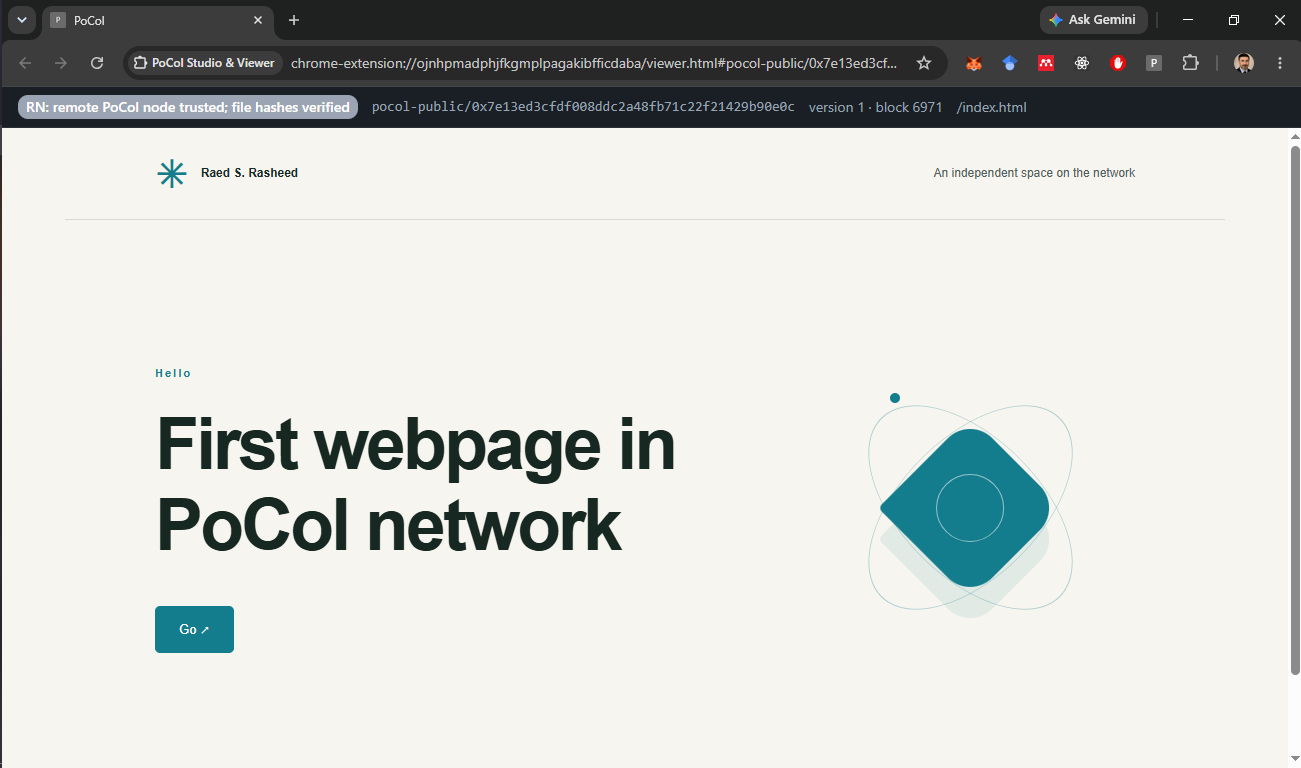
Download the signed PoCol extension, verify its signature and extract it. Open chrome://extensions, enable Developer mode and select Load unpacked. Choose the extracted folder containing manifest.json.
Open Studio and create a project. Choose a template or import your files, add your content, and preview your page on desktop and mobile.
Choose Publish to PoCol. In the extension, create or unlock your wallet, review the files and fee cap, then approve and select Confirm & publish.
Keep the extension tab open until publishing completes. Open your website and share its PoCol address with other extension users.
The extension package of the signed release includes tools/Export-Studio-Wallet.ps1. Run it locally to create an encrypted JSON export with a password of at least 10 characters. Import that file only in the extension confirmation tab and enter the export password there.
Save your project and export a backup from Studio. For later updates, open that project and publish with a wallet authorized for the existing website.
Available on PoCol Mainnet. The extension verifies file hashes and trusts the configured remote node for chain execution. Publishing fees are shown in PCOL for approval before signing.
How websites work on PoCol ↗An idea, a few lines of Solidity, a contract you can use. PoCol IDE brings your editor, compiler and testing workspace together in the browser.
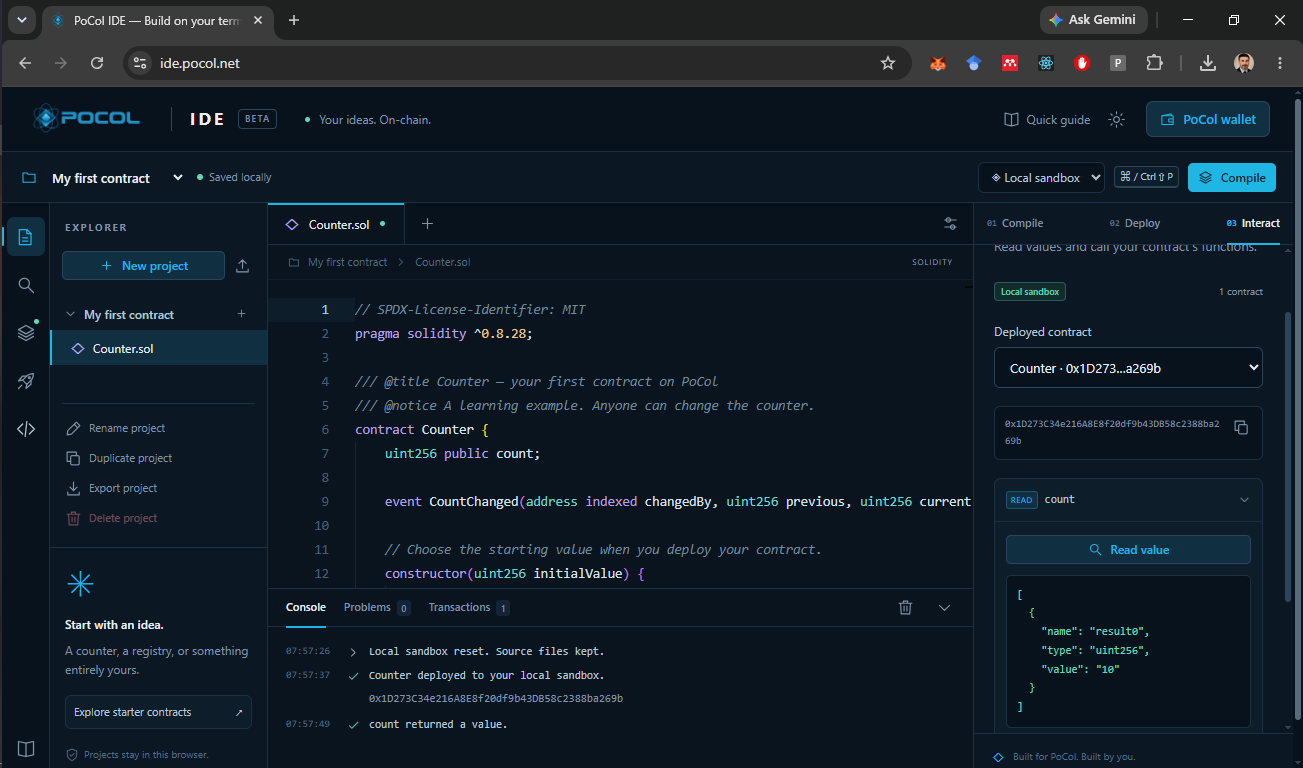
Start from a contract template, organize your files and resolve compiler messages beside your code. Export your project when you want a backup.
Deploy to a local sandbox, call functions and inspect results. Learn and experiment with simulated funds, without connecting a wallet.
Move to PoCol Mainnet when you are ready. Review the account, transaction and maximum PCOL fee in the extension before you approve signing.
Open the Counter starter in PoCol IDE. Edit Counter.sol, then select Compile. Resolve any errors and select the compiled contract.
Keep Local sandbox selected. In Deploy, set the initial value to 10 and deploy. In Interact, read count, call increment, then read count again: 11.
Install the Chrome extension, select PoCol Mainnet and open Deploy. Enter the constructor inputs and select Continue in PoCol wallet. In the extension, unlock your wallet, review the deployment and PCOL fee cap, then confirm.
Wait for the transaction receipt, then open Interact to read values or call functions. State changes require a new wallet approval. Follow the transaction in Explorer and export your project backup.

PoCol Studio & Viewer connects your website and contract workflows to local wallet approval. One extension covers both.
For a new installation, verify the signature of the signed release's extension package and extract it, open chrome://extensions, enable Developer mode and select Load unpacked. Choose the folder containing manifest.json. To upgrade an existing installation, follow this order: export your wallet, click Remove on the old version at chrome://extensions, verify the signature of the new package, load it with Load unpacked, compare the extension ID Chrome shows with the one published on pocol.net, then import your wallet in the confirmation tab.
Check the two values this page publishes: the official extension ID is gggcoflmedlhlkcdhebmoepmggdnafmp, and releases are signed with the PoCol release key (ssh-keygen, namespace pocol-release) whose fingerprint is SHA256:r/IMxkMr+wv3OyAbiX3XYhSV4pqy3Lv5/z/VV06DJyc. Load a package only if its signature verifies with that key and Chrome shows that extension ID.
The extension includes tools/Export-Studio-Wallet.ps1 for Windows and tools/export-studio-wallet.py for Linux. Follow the included instructions to create an encrypted wallet export on your device. Import and unlock it only in the extension wallet tab. The IDE never asks for your private key or wallet password.
Projects are saved in this browser on this site. Export a ZIP to keep a copy outside the browser or move to another device. The local sandbox is temporary: resetting it or reloading the page clears its deployed contracts and simulated balances.
The sandbox runs Cancun EVM execution locally. It does not publish to PoCol or reproduce PoCol consensus and all network-specific limits. A PoCol Mainnet deployment is a separate transaction and needs an account with PCOL for fees.
PoCol IDE is an experimental development tool. The Mainnet connection checks network identity and relies on the configured remote node. Test your contracts before deploying; starter contracts are learning examples.
Network explorer ↗Proof of Collaboration puts coordination at the heart of the idea: how can participants work together within one network?
Coordinating work ranges across participants is the starting point of PoCol’s approach.
A place to explore blocks, transactions, and network activity when the explorer is connected.
A developer journey from understanding the protocol to integrations and applications as tools become available.
Manage PCOL with the native Windows and Android wallets, or run a Linux node. Choose the application that fits your device.
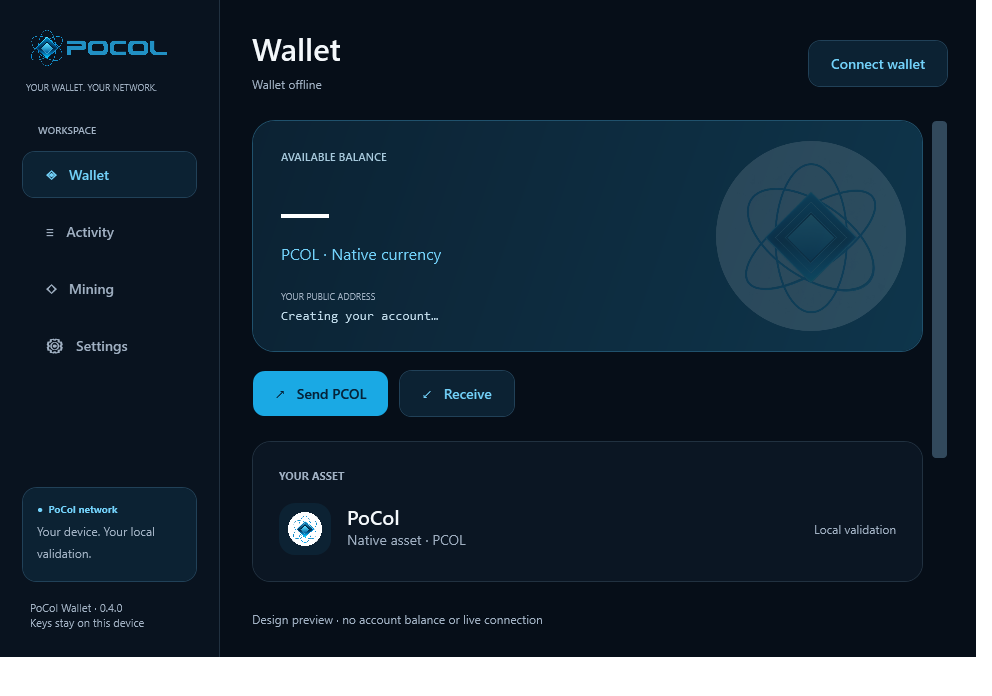
A consistent PoCol experience, from your balance to your next transaction. Clear navigation, focused actions and the same visual identity across desktop and mobile.
Each release pins the network it connects to, including its fork schedule; there is no activation setting in the native applications or in the Chrome extension. Use the native package together with the public network file published with it.
DESKTOP WALLET
Your balance, transfers, activity and mining controls in one native desktop application.
No release availableDownload the official network file to connect your wallet to PoCol Mainnet. Open Settings, import network.pocol.json, and check the network connection.
MOBILE WALLET
Your balance, transfers, activity and optional mining in one native mobile application.
No release availableDownload the official network file to connect your wallet to PoCol Mainnet. Open Settings, import network.pocol.json, and check the network connection.
NODE & COMMAND LINE
Run a validating node with command-line tools and an optional desktop shortcut. This package has no graphical wallet.
No release availableA native application for this platform is not available yet.
A native application for this platform is not available yet.
POCOL FEE FAUCET
Eligible new accounts can receive 0.002 PCOL to cover their first mining registration fee without an initial mining bond.
Copy your public wallet address, request your first fee from the PoCol Faucet, then return to your wallet to register for mining.
Once per eligible new account. Daily limits apply.
Every file of a signed PoCol release, and the release’s SHA256SUMS, is signed with the PoCol release key (fingerprint SHA256:r/IMxkMr+wv3OyAbiX3XYhSV4pqy3Lv5/z/VV06DJyc). Before you run a file, check the signature of SHA256SUMS and your file’s line in it. A matching checksum alone does not show who published the file. PoCol Mainnet 0.5.0 packages and the signed network file are available here. Verify the release manifest, signatures, and file checksums before use; this page links no packages from the retired network.
Verification steps ↗PoCol Mainnet is a new network. Its Windows package and network.pocol.json are published with its signed release; verify both before use. Keep the network file beside PoCol-Wallet.exe, or import it in Settings. Wallets from the retired network do not carry over, so start with a new wallet home.
Download the official network file to connect your wallet to PoCol Mainnet. Open Settings, import network.pocol.json, and check the network connection.
Balances, bonds and history from the retired network do not carry over to the new network, and an existing wallet folder cannot be upgraded to it. Close the wallet and move the %LOCALAPPDATA%\PoCol folder aside (do not delete it): your old key stays in that folder. Then extract the new package into a new folder.
PoCol Wallet for the new network is a separate application (org.pocol.wallet). It installs beside the earlier app and does not update it or read its data. Accounts and balances from the retired network do not carry over.
Signed release · SHA256SUMS · SHA256SUMS.sig
PoCol Mainnet applications. The implementation remains experimental, and no independent security audit has been done yet. Platform availability reflects the applications actually built and verified.
The collaborative mechanism and its research foundations.
Wallets, participation, and exploring activity.
Developing tools and applications for participants.
An overview of direction. Delivery milestones and dates will be published once the roadmap is confirmed.